TrendSpider Market Scanner Review: Find Trading Opportunities Automatically
Affiliate Disclaimer: This TrendSpider Market Scanner Review contains affiliate links
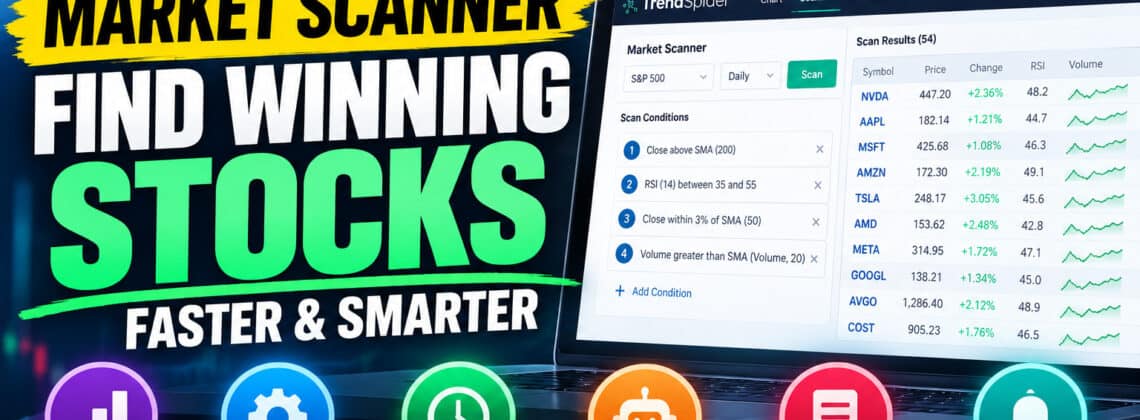
One of my favorite features of TrendSpider is its powerful Market Scanner, which allows traders to search for potential trading opportunities without spending hours manually examining hundreds of stock charts.
If you’ve ever used TradingView or another charting platform, you’ll know how time-consuming it can be to search for stocks that meet your particular trading criteria.
Maybe you’re looking for stocks breaking above resistance, stocks experiencing a pullback in an established uptrend, or stocks showing signs of a potential reversal.
Traditionally, you might have to examine dozens or even hundreds of charts to find these opportunities.
TrendSpider makes that process considerably easier by allowing you to scan the market for the exact technical conditions you’re interested in.
And what’s particularly impressive is just how sophisticated these scans can become.
>>Get a TrendSpider TRIAL subscription to test it out HERE!!!<<
1. Scan Stocks Using Hundreds of Technical Indicators
TrendSpider allows you to search for stocks based on a wide variety of technical indicators and market conditions.
For example, you can create scans using:
- Relative Strength Index (RSI)
- Moving Average Convergence Divergence (MACD)
- Simple and exponential moving averages
- Bollinger Bands
- Trading volume
- Price action and momentum
- Candlestick patterns
- Support and resistance conditions
Let’s say you’re interested in finding oversold stocks.
You could create a simple scan that searches for stocks with an RSI below 30.
Or perhaps you’re looking for bullish stocks trading above their 200-day moving average.
TrendSpider can identify securities meeting those conditions without requiring you to manually examine every chart.
The real advantage is that you can customize the scanner around your own trading strategy rather than relying on someone else’s stock picks.
2. Combine Multiple Conditions to Find Specific Trading Setups
This is where TrendSpider’s scanning capabilities become particularly interesting.
Instead of searching for stocks meeting just one technical condition, you can combine multiple conditions to create much more sophisticated scans.
For example, imagine you’re looking for potential bullish swing trades.
You might want to find stocks that meet all three of these requirements:
- Trading above their 200-day moving average, suggesting a longer-term uptrend.
- Showing an RSI below 40, indicating relatively weak short-term momentum or a possible pullback.
- Experiencing above-average trading volume.
Rather than searching for these conditions individually, TrendSpider can evaluate them together.
You could also create scans looking for stocks breaking above resistance, showing bullish momentum, or experiencing potential trend reversals.
This flexibility is particularly useful because traders rarely make decisions based on a single technical indicator.
The ability to combine several technical conditions helps narrow the market down to stocks that more closely match your preferred setups.
Of course, finding a matching stock doesn’t guarantee a profitable trade. You’ll still need to evaluate the chart and manage your risk.
>Get a TrendSpider TRIAL subscription to test it out HERE!!!<<
3. Multi-Timeframe Scanning: A Major Advantage
Another feature I particularly like is TrendSpider’s ability to combine technical conditions from different timeframes.
TrendSpider supports scanning across up to three timeframes within a single scan.
Why is this useful?
Well, imagine you’re a swing trader looking for stocks in a strong longer-term uptrend that are currently experiencing a short-term pullback.
You could create a scan with the following conditions:
- Daily timeframe: Stock price is above its 200-day moving average.
- Four-hour timeframe: RSI is below 40, suggesting a potential pullback.
- One-hour timeframe: RSI crosses above 50, suggesting momentum may be improving.
The scanner can search for stocks meeting all three conditions simultaneously.
This allows you to combine longer-term trend analysis with shorter-term entry signals.
For traders who use multiple timeframe analysis, this can be a substantial time-saver.
Instead of manually switching between daily, four-hour, and hourly charts for dozens of stocks, you can have TrendSpider narrow down the candidates automatically.

4. Use Artificial Intelligence to Build Your Scans
One of the more exciting developments in TrendSpider is its integration of artificial intelligence.
Through its Sidekick AI assistant, traders can describe the types of stocks they’re looking for using ordinary language.
For example, you could ask:
“Find stocks in the S&P 500 trading above their 200-day moving average, with an RSI below 40 and above-average trading volume.”
TrendSpider’s AI can help translate that request into scanning conditions.
This is particularly appealing if you’re not familiar with configuring complicated technical scans.
Rather than spending time learning every setting and menu, you can describe the type of trading opportunity you’re interested in and let the AI help build the scan.
You should still review the generated conditions to make sure they accurately represent your strategy.
But for traders looking to simplify the process of creating sophisticated scans, this is a useful feature.
TrendSpider Market Scanner Review!
5. More Than 70 Built-In Scanners
You don’t necessarily have to create your own scans from scratch.
TrendSpider also provides a library of more than 70 prebuilt scans covering a variety of technical trading strategies.
These include scans designed to identify:
- Bullish and bearish momentum
- RSI breakouts
- Moving average pullbacks
- Bollinger Band squeezes
- Potential price breakouts
- Unusual trading volume
- Other technical trading conditions
This makes it easier for beginners to explore the platform.
You can start with an existing scan, examine the results, and gradually learn how to modify the conditions to suit your own trading approach.
For experienced traders, the prebuilt scans can also provide a convenient starting point for developing more customized strategies.
>Get a TrendSpider TRIAL subscription to test it out HERE!!!<<
6. Schedule Scans and Automate Your Market Research
Another feature worth highlighting is the ability to automate your scanning routine.
Once you’ve created a scan that you like, you can save it and run it again whenever you want.
TrendSpider also supports scheduled scanning, allowing you to receive results without manually running the same scan every day.
For example, imagine you have a swing-trading strategy that looks for stocks pulling back toward their 50-day moving average.
Instead of manually checking the entire S&P 500 every evening, you could schedule your scan to run after the market closes.
TrendSpider can then send you the results, allowing you to focus on analyzing the stocks that meet your conditions.
This is particularly useful for traders who have full-time jobs or simply don’t want to spend hours watching charts.
The platform also offers Smart Watchlists, helping you organize and monitor securities that meet your criteria.
7. Go Beyond Scanning With Backtesting and Trading Automation
One thing that makes TrendSpider interesting is that its scanner isn’t an isolated feature.
It’s part of a much larger trading analysis platform.
Once you’ve identified potential opportunities, you can investigate them using TrendSpider’s charting tools, technical analysis features, alerts, and strategy-testing capabilities.
For example, you might create a scan looking for stocks that meet a particular combination of moving average and RSI conditions.
After finding potential candidates, you could use TrendSpider’s separate backtesting tools to investigate how a properly defined version of that strategy would have performed historically.
TrendSpider also provides trading automation tools for traders interested in developing systematic strategies.
This creates a workflow where you can:
- Find potential opportunities using the Market Scanner.
- Analyze the results using advanced technical charts.
- Test your trading ideas using historical data.
- Monitor conditions with alerts and scheduled scans.
- Automate eligible strategies using compatible trading integrations.
It’s important to understand that scanning, backtesting, and automation are separate capabilities. A scan does not automatically become a validated or profitable trading system.
Nevertheless, having these tools within one platform can make the research process more convenient.
>Get a TrendSpider TRIAL subscription to test it out HERE!!!<<
TrendSpider Scanner vs TradingView: Which Is Better?
Now, if you’re already using TradingView, you might be wondering whether TrendSpider’s scanning capabilities are actually better.
And I think this is an interesting comparison.
TradingView has some excellent stock screening tools of its own, including technical indicators, customizable filters, and multi-timeframe analysis.
So I certainly wouldn’t suggest that TradingView is incapable of performing sophisticated scans.
However, what I particularly like about TrendSpider is how much emphasis it places on automation and systematic technical analysis.
TrendSpider makes it possible to build complex scans combining multiple indicators, price action, volume, and different timeframes.
Its Sidekick AI assistant can help create scans using natural-language instructions.
You can schedule your scans to run automatically, and then investigate the results using TrendSpider’s charting and strategy-testing tools.
TradingView, meanwhile, has some important advantages of its own, particularly its enormous community of traders and developers and its extensive library of Pine Script indicators.
If you’re heavily invested in the TradingView indicator ecosystem, that may be an important consideration.
But for traders who want to automate more of their market research, TrendSpider offers an attractive alternative.
I think the biggest distinction is that TrendSpider places scanning within a broader workflow of automated technical analysis, strategy research, and trading automation.
That’s where I believe it becomes particularly interesting compared with TradingView.
My Verdict: Is TrendSpider’s Market Scanner Worth Using?
Overall, I think TrendSpider’s Market Scanner is one of the platform’s most compelling features.
What makes it powerful isn’t simply that it can search for stocks based on technical indicators.
Plenty of trading platforms can do that.
It’s the combination of sophisticated scanning conditions, multiple timeframe analysis, AI assistance, prebuilt strategies, and automated scanning that makes it stand out.
The biggest selling point is simple: You can tell TrendSpider what kind of trading setup you’re looking for, and it can search the market to identify stocks matching those conditions.
Instead of spending hours manually examining hundreds of charts, you can narrow down the market to a smaller group of potential opportunities.
That doesn’t mean every result will turn into a winning trade.
But it does mean you can spend less time searching for setups and more time analyzing the opportunities that interest you.
For active swing traders, technical analysts, and traders who want to develop more systematic trading strategies, I think that’s a compelling reason to consider TrendSpider.
Want to see what TrendSpider can do?
Get a TrendSpider TRIAL subscription to test it out HERE!!!<<
TrendSpider Market Scanner Review – Related Articles
RayAlgo vs VIP Algos 2026: Which TradingView Indicator Is Better?
7 Best TradingView Indicators in 2026: Top Buy and Sell Signal Tools Compared
RayAlgo vs LuxAlgo (2026): Indicators, Alerts, Pricing & Which Is Better?

Leave a Reply