TrendSpider Review: Is This AI Trading Platform Better Than TradingView?
Affiliate Disclosure: This article may contain affiliate links. If you purchase through these links, we may earn a commission at no additional cost to you. TrendSpider Review.
TrendSpider Review 2026: Is It Worth the Money?
Artificial intelligence is rapidly changing how traders analyze financial markets. From automated chart patterns to sophisticated trading bots, technology is making it possible to perform tasks that previously required hours of manual analysis.
One platform attracting attention is TrendSpider, an advanced charting and technical analysis platform designed to help traders identify opportunities, test strategies, and automate portions of their trading workflow.
But is TrendSpider actually worth paying for?
And perhaps more importantly, can it compete with TradingView, one of the most popular charting platforms in the world?
In this TrendSpider review, we’ll examine its features, advantages, disadvantages, pricing, and suitability for different types of traders.
Visit the Official TrendSpider Website
TrendSpider Review: What Is TrendSpider?
TrendSpider is a technical analysis and trading research platform that combines charting, automated pattern recognition, market scanning, backtesting, and artificial intelligence.
Unlike conventional charting software that requires traders to manually identify every trendline, support level, or chart formation, TrendSpider can automate several of these processes.
Its major capabilities include:
- Automated trendline detection and technical analysis
- AI-assisted chart analysis
- Automated Fibonacci tools and pattern recognition
- Strategy backtesting without traditional programming
- Market scanners and customizable alerts
- Trading bots and automated order routing
- Multi-timeframe analysis
- More than 300 technical indicators
- AI-assisted custom indicator development
The platform supports analysis across several asset classes, including stocks, ETFs, cryptocurrencies, forex, and futures, although specific data feeds and exchange fees vary.
The result is a sophisticated platform aimed at traders who want to spend less time manually analyzing charts and more time researching and executing their strategies.
>Get a TrendSpider TRIAL subscription to test it out HERE!!!<<
1. Automated Technical Analysis: TrendSpider’s Biggest Strength
One of TrendSpider’s most distinctive features is its automated technical analysis.
If you’ve spent much time using traditional charting platforms, you probably know how tedious drawing trendlines can become.
You identify important highs and lows, connect price points, adjust the lines, and repeat the process across multiple timeframes.
TrendSpider attempts to simplify that workflow.
Automated Trendlines
TrendSpider can identify potential trendlines automatically, helping traders recognize areas where price may encounter support or resistance.
This is particularly useful for traders monitoring dozens of stocks simultaneously.
Rather than manually drawing every trendline, you can use the automated analysis as a starting point.
However, automated trendlines should not be treated as guaranteed trading signals. Different settings and market conditions can produce different interpretations.

Automated Fibonacci Analysis
Fibonacci retracements are popular among technical traders, but selecting the appropriate swing highs and lows can be subjective.
TrendSpider offers automated Fibonacci analysis to help identify potential retracement levels.
This may be particularly valuable for swing traders looking for pullback opportunities.
Multi-Timeframe Analysis
Another important feature is the ability to incorporate information from multiple timeframes.
For example, a trader might analyze a stock using the daily chart while referencing longer-term technical conditions.
This can help distinguish short-term price movements from broader market trends.
My assessment: Automated technical analysis is one of the strongest reasons to consider TrendSpider, particularly if you regularly analyze large numbers of charts.
>>Get a TrendSpider TRIAL subscription to test it out HERE!!!<<
2. TrendSpider Sidekick: AI-Powered Trading Research
Artificial intelligence is becoming an increasingly important part of trading software, and TrendSpider has invested in this area through its Sidekick AI assistant.
Sidekick allows traders to interact with the platform using natural language.
Instead of manually searching through numerous menus or configuring every analytical tool, users can ask questions and request assistance with trading research.
Potential uses include:
- Researching technical conditions on individual stocks
- Interpreting market trends
- Exploring possible trading setups
- Assisting with strategy development
- Analyzing charts and market data
- Investigating technical indicators
This is an interesting development because it makes sophisticated market analysis more accessible to traders who aren’t programmers.
However, it’s important to understand that AI-generated analysis can be inaccurate.
Sidekick should be viewed as a research assistant rather than an infallible trading advisor.
Does TrendSpider’s AI Actually Predict Stock Prices?
Not reliably or with certainty.
No legitimate trading platform can consistently predict future stock prices.
TrendSpider’s AI tools can help identify historical patterns, analyze market conditions, and support research.
That doesn’t mean the platform knows which direction a stock will move next.
Traders should independently validate any AI-generated conclusions before risking capital.
3. TrendSpider Strategy Backtesting: Test Before You Trade
One of the most valuable features of TrendSpider is its strategy backtesting functionality.
Many traders develop strategies based on technical indicators without ever examining whether those strategies performed consistently in the past.
TrendSpider provides tools for testing trading rules against historical market data.
How Does TrendSpider Backtesting Work?
Imagine you’re developing a strategy involving two moving averages.
Your hypothetical rules might be:
Buy condition: The 20-period moving average crosses above the 50-period moving average.
Sell condition: The 20-period moving average crosses below the 50-period moving average.
Rather than manually examining hundreds of historical charts, you can configure these conditions in a strategy tester.
TrendSpider can then analyze historical signals and provide performance statistics.
Depending on the configuration, these may include trade frequency, profitability, drawdowns, and other measures of historical performance.
>>Get a TrendSpider TRIAL subscription to test it out HERE!!!<<
TrendSpider Review: Why Backtesting Matters
Backtesting helps traders evaluate whether an idea deserves further investigation.
It can also expose weaknesses that might not be obvious from looking at a handful of successful trades.
For example, a strategy might appear profitable during strongly trending markets but struggle when prices move sideways.
However, backtesting has important limitations.
Historical results do not guarantee future performance. Overfitting, transaction costs, slippage, and changing market conditions can all affect real-world results.
For serious traders, backtesting is a useful research tool, not proof that a strategy will make money.
4. TrendSpider Trading Bots and Automation
Another reason traders may consider TrendSpider is its trading automation functionality.
The platform supports strategy bots and automated trading workflows.
These tools can help users monitor predefined conditions and, with appropriate integrations, automate certain trading actions.
For example, a trader might create rules based on moving averages, momentum indicators, and market conditions.
Instead of watching charts throughout the trading day, the system can monitor those conditions automatically.
>>Get a TrendSpider TRIAL subscription to test it out HERE!!!<<
TrendSpider Review: Can TrendSpider Place Trades Automatically?
TrendSpider supports automated order routing through its SignalStack technology and compatible integrations.
However, supported brokers, asset classes, order types, and execution capabilities should be verified before subscribing.
Automated trading also introduces additional risks, including incorrect strategy logic, unexpected executions, and technical failures.
It is essential to test strategies carefully and understand how the system behaves before enabling live trading.
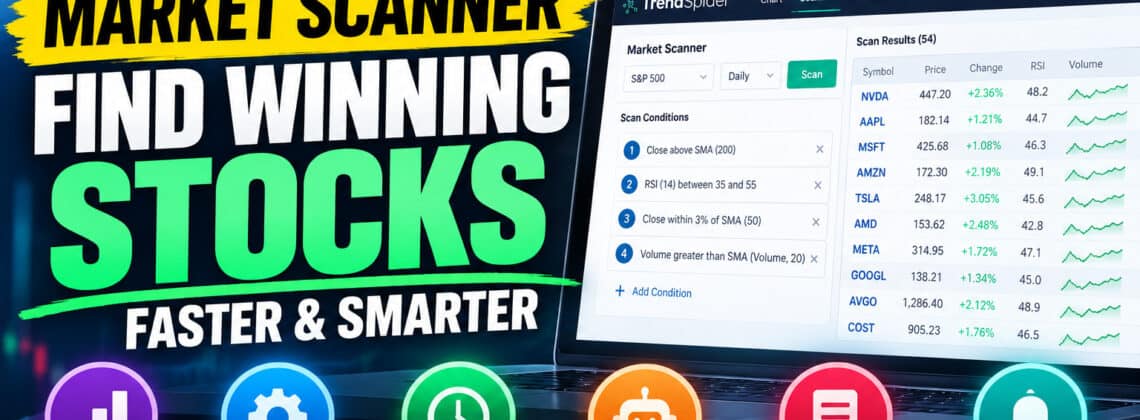
5. TrendSpider Market Scanner: Find Trading Opportunities Faster
One problem faced by active traders is the enormous number of potential trading opportunities.
There are thousands of publicly traded stocks, and manually checking every chart is impossible.
TrendSpider’s market scanning tools allow traders to search for securities that meet predefined technical conditions.
For example, you might search for stocks that:
- Are trading above their 200-day moving average
- Have an RSI below a specified threshold
- Show increasing trading volume
- Meet a particular trend or momentum condition
- Satisfy multiple technical rules simultaneously
This can help traders narrow their attention to securities matching their preferred strategies.
For swing traders, in particular, scanning can be one of the most valuable features of a technical analysis platform.
Rather than searching randomly for setups, you can systematically identify candidates that match your criteria.
6. TrendSpider Raindrop Charts: An Alternative to Candlesticks
One of TrendSpider’s more unusual features is its proprietary Raindrop charting technology.
Most traders are familiar with traditional candlestick charts, which display the open, high, low, and close of a trading period.
Raindrop charts offer a different way to visualize price action by incorporating information about trading activity and volume distribution.
The objective is to provide additional context about how trading developed during a particular period.
For traders interested in volume analysis, this alternative visualization may be worth exploring.
That said, Raindrop charts aren’t necessarily better than candlesticks for every strategy.
Their usefulness depends on how you analyze the market and whether the additional information improves your decision-making.
>>Get a TrendSpider TRIAL subscription to test it out HERE!!!<<
7. TrendSpider Pricing in 2026
TrendSpider is a premium subscription platform, and pricing is one of its biggest potential drawbacks.
It offers four main subscription tiers, with differences primarily involving capacity, backtesting depth, scanning frequency, and the number of available alerts and bots.
| Plan | Regular monthly price* | Best suited for |
|---|---|---|
| Standard | $89 | Hobbyists and part-time traders |
| Premium | $149 | Active swing and intraday traders |
| Enhanced | $199 | Highly active technical traders |
| Advanced | $349 | Systematic and quantitative traders |
These are indicative regular monthly prices for individual subscriptions, before promotional discounts. Actual pricing can vary by billing arrangement, promotion, account classification, and optional data subscriptions.
TrendSpider frequently offers discounted introductory pricing and paid trials.
Some market data feeds and advanced AI usage may involve additional charges.
Check Current TrendSpider Plans and Pricing
TrendSpider Review: Which TrendSpider Plan Is Best?
For many active retail traders, Premium may provide a reasonable balance between features and capacity.
However, traders with simpler needs may find Standard sufficient.
More advanced traders running numerous alerts, bots, or detailed backtests may benefit from Enhanced or Advanced.
The important question isn’t necessarily which plan offers the most features.
It’s whether you’ll actually use enough of those features to justify the recurring expense.
8. TrendSpider vs TradingView: Which Is Better?
This is probably the most interesting comparison for traders already familiar with TradingView.
Both platforms provide technical charting and analytical tools, but their strengths differ.
| Feature | TrendSpider | TradingView |
|---|---|---|
| Technical charting | Excellent | Excellent |
| Automated trendline analysis | Major focus | Varies by tools and scripts |
| Custom indicators | JavaScript and visual tools | Pine Script |
| Strategy backtesting | Integrated, including no-code workflows | Pine Script strategy testing |
| Market scanning | Advanced | Available |
| Trading automation | Integrated bot workflows | Alerts and external integrations |
| AI-assisted research | Sidekick AI | Different AI/tool ecosystem |
| Community scripts | Smaller ecosystem | Very large ecosystem |
| Ease of use | Learning curve | Familiar to many retail traders |
TrendSpider Review: Where TrendSpider Has an Advantage
TrendSpider’s strongest selling point is its emphasis on automated technical analysis and integrated strategy research.
If your trading process involves repeatedly drawing trendlines, screening stocks, testing strategies, and configuring alerts, TrendSpider may save you considerable time.
Its combination of automated analysis and no-code strategy tools can be especially appealing.
Where TradingView Has an Advantage
TradingView has a large ecosystem of traders, developers, educational content, and custom Pine Script indicators.
For traders who depend on specific third-party indicators, TradingView may still be the more practical choice.
TradingView is also familiar to many retail traders, making it easier to find tutorials and community discussions.
Could TrendSpider Replace TradingView?
For some traders, absolutely.
If your primary focus is technical analysis, market scanning, and systematic strategy research, TrendSpider could potentially replace much of your TradingView workflow.
However, if you rely heavily on specialized Pine Script indicators, you should verify that comparable tools exist on TrendSpider before switching.
My assessment: TrendSpider is particularly compelling as a research and automation platform, while TradingView remains a strong option for charting and its extensive indicator ecosystem.
>>Get a TrendSpider TRIAL subscription to test it out HERE!!!<<
9. TrendSpider Pros and Cons
Advantages
Automated technical analysis: Helps reduce repetitive charting tasks.
Powerful backtesting: Allows traders to investigate historical strategy performance.
AI integration: Sidekick adds natural-language research capabilities.
Market scanning: Useful for finding securities matching technical conditions.
Trading automation: Supports systematic workflows and bot-based strategies.
Multi-timeframe analysis: Helps traders evaluate price action across different horizons.
Disadvantages
Relatively expensive: Monthly subscriptions can be difficult to justify for casual traders.
Learning curve: The number of available tools may overwhelm beginners.
Additional costs: Certain market data and AI upgrades cost extra.
No guaranteed trading edge: Advanced tools do not automatically produce profitable strategies.
Different indicator ecosystem: TradingView users may need alternatives to familiar Pine Script indicators.
>>Get a TrendSpider TRIAL subscription to test it out HERE!!!<<
10. Who Should Use TrendSpider?
TrendSpider isn’t necessarily the right choice for everyone.
Swing Traders
Swing traders may benefit from automated trendlines, multi-timeframe analysis, scanners, and alerts.
These features can help identify potential opportunities without requiring constant chart monitoring.
Day Traders
Active day traders may appreciate advanced scanning, technical indicators, and automation.
However, execution speed, broker compatibility, and data requirements should be evaluated carefully.
Systematic Traders
Traders developing rule-based strategies are among the strongest potential candidates.
TrendSpider’s backtesting and automation tools can help turn trading ideas into testable systems.
Beginners
Beginners can use TrendSpider, but the platform may be more sophisticated and expensive than necessary for someone just learning basic technical analysis.
A simpler charting setup may be more appropriate initially.
11. Is TrendSpider Legit?
Yes. TrendSpider is an established commercial trading analysis platform offering charting, market research, and automation software.
However, it’s important to distinguish between a legitimate software platform and a profitable trading strategy.
TrendSpider can help you analyze securities and test trading ideas.
It cannot guarantee profitable trades, eliminate market risk, or replace sound risk management.
Before subscribing, review the platform’s current features, billing terms, cancellation policies, and compatibility with your trading approach.
12. Is TrendSpider Worth It in 2026?
Ultimately, TrendSpider’s value depends on how seriously you approach trading and which features you actually need.
For someone who occasionally checks stock charts, the subscription cost may be difficult to justify.
But for active traders who spend hours every week analyzing charts, testing strategies, and scanning markets, the automation features could provide meaningful workflow benefits.
I find the combination of automated technical analysis, strategy backtesting, and AI-assisted research particularly compelling from a feature standpoint.
The biggest question is whether these tools improve your actual trading process enough to justify the expense.
Remember, paying for sophisticated software doesn’t automatically improve your trading results.
The value comes from using the tools effectively.
TrendSpider Review: Frequently Asked Questions
Is TrendSpider better than TradingView?
TrendSpider may be better suited to traders prioritizing automated technical analysis, integrated backtesting, and AI-assisted research. TradingView may be preferable for traders who rely on its extensive Pine Script ecosystem and community indicators.
Does TrendSpider use artificial intelligence?
Yes. TrendSpider includes AI-assisted features such as Sidekick, alongside automated technical analysis and other advanced research tools.
Can beginners use TrendSpider?
Yes, although beginners may find the platform’s features and subscription costs more than they initially need.
Can TrendSpider automatically trade stocks?
TrendSpider supports automated trading workflows and order routing through compatible services and integrations. The exact functionality depends on your setup.
Does TrendSpider have a free version?
TrendSpider primarily operates as a paid subscription service. Promotional trials may be available, but the full platform is not generally offered as a permanently free charting service.
Can TrendSpider replace TradingView indicators?
Some analytical tasks can be replicated using TrendSpider’s built-in indicators and custom development tools. However, Pine Script indicators cannot simply be assumed to work directly on TrendSpider.
TrendSpider Review Final Verdict: Should You Buy TrendSpider?
TrendSpider deserves serious consideration from traders looking for something beyond conventional charting software.
Its emphasis on automated technical analysis, market scanning, strategy backtesting, and AI-assisted research makes it a potentially powerful platform for active traders.
The platform’s biggest advantage is not that it predicts winning trades.
It’s that it can help traders analyze markets more systematically and automate repetitive parts of their workflow.
For traders who value those capabilities, TrendSpider could be worth the subscription.
For casual traders, however, the cost and complexity may outweigh the benefits.
Overall assessment: TrendSpider looks particularly attractive for active swing traders, technical analysts, and systematic traders who want an integrated research and automation platform.
I hope you have found this TrendSpider Review helpful!
>>Get a TrendSpider TRIAL subscription to test it out HERE!!!<<
TrendSpider Review: Ready to Explore TrendSpider?
Discover its automated charting tools, AI features, trading scanners, and strategy backtesting capabilities.
>>Get a TrendSpider TRIAL subscription to test it out HERE!!!<<
TrendSpider Review: Related Articles
RayAlgo vs VIP Algos 2026: Which TradingView Indicator Is Better?
7 Best TradingView Indicators in 2026: Top Buy and Sell Signal Tools Compared
RayAlgo vs LuxAlgo (2026): Indicators, Alerts, Pricing & Which Is Better?
VIP Algos Review 2026: Are These TradingView Indicators Worth Buying?
Is RayAlgo Legit? What You Need to Know Before Buying (2026 Review)
TrendSpider Review: Is This AI Trading Platform Better Than TradingView?

Leave a Reply